Mối quan hệ một-một là một mối quan hệ rất cơ bản. Trong hướng dẫn này, tôi sẽ hướng dẫn bạn cách tạo dữ liệu và truy xuất dữ liệu bằng Eloquent Model.

Trong hướng dẫn này, tôi sẽ tạo hai bảng là users và phones với cấu trúc cơ sở dữ liệu như sau:
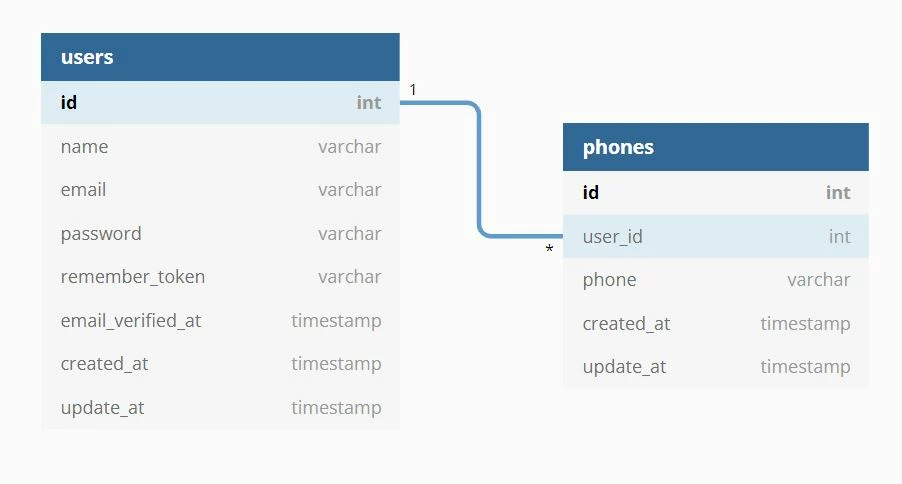
One to One Relationship sẽ sử dụng "hasOne()" và "belongsTo()" cho mối quan hệ.

Tạo Migrations

Bây giờ chúng ta phải tạo migrate cho bảng users, bảng phones và thêm foreign key với bảng users. Vì vậy, bạn hãy tạo như hướng dẫn dưới đây:

Migration bảng users

Schema::create('users', function (Blueprint $table) {
    $table->id();
    $table->string('name');
    $table->string('email')->unique();
    $table->timestamp('email_verified_at')->nullable();
    $table->string('password');
    $table->rememberToken();
    $table->timestamps();
});

Migration bảng phones

Schema::create('phones', function (Blueprint $table) {
    $table->id();
    $table->unsignedBigInteger('user_id');
    $table->string('phone');
    $table->timestamps();
    $table->foreign('user_id')->references('id')->on('users')->onDelete('cascade');
});

Tạo Models

Ở đây, chúng ta sẽ tạo model bảng users và phones. Chúng ta cũng sẽ sử dụng "hasOne ()" và "belongsTo()" cho mối quan hệ của cả hai model.

Model bảng users

<?php
namespace App\Models;
use Illuminate\Notifications\Notifiable;
use Illuminate\Foundation\Auth\User as Authenticatable;

class User extends Authenticatable
{
    use Notifiable;
    /**
     * The attributes that are mass assignable.
     *
     * @var array
     */
    protected $fillable = [
        'name', 'email', 'password',
    ];

    /**
     * The attributes that should be hidden for arrays.
     *
     * @var array
     */
    protected $hidden = [
        'password', 'remember_token',
    ];

    /**
     * Get the phone record associated with the user.
     */
    public function phone()
    {
        return $this->hasOne(Phone::class);
    }
}

Model bảng phones

<?php
namespace App\Models;
use Illuminate\Database\Eloquent\Model;

class Phone extends Model
{
    /**
     * Get the user that owns the phone.
     */
    public function user()
    {
        return $this->belongsTo(User::class);
    }
}

Truy vấn dữ liệu

$phone = User::find(1)->phone;
dd($phone);
$user = Phone::find(1)->user;
dd($user);

Tạo mới dữ liệu

$user = User::find(1);
$phone = new Phone;
$phone->phone = '9429343852';
$user->phone()->save($phone);
$phone = Phone::find(1);
$user = User::find(10);
$phone->user()->associate($user)->save();

Tôi hy vọng bạn thích hướng dẫn này. Nếu bạn có bất kỳ câu hỏi nào hãy liên hệ với chúng tôi qua trang contact. Cảm ơn bạn.

 

CÓ THỂ BẠN QUAN TÂM

Integrating AI Assistant with CKEditor 5 in Laravel using Vite

Integrating AI Assistant with CKEditor 5 in Laravel using Vite

OpenAI OpenAI là một công ty nghiên cứu và triển khai trí tuệ nhân tạo, nổi tiếng với việc phát triển các mô hình AI tiên tiến. Mục tiêu của OpenAI là đảm bảo rằng trí tuệ nhân tạo tổng quát (AGI...

Laravel Middlewares

Laravel Middlewares

Middleware cung cấp một cơ chế thuận tiện để lọc các yêu cầu HTTP gửi đến ứng dụng bạn. Nó là một lớp trung gian nằm giữa request và controller. Bạn có thể thêm các xử lý logic trước khi gửi đến contr...

Csv import with Validation for Laravel

Csv import with Validation for Laravel

Trong một bài viết lúc trước, mình đã chia sẻ đến các bạn cách xây dựng một service import và export CSV sử dụng Facades, nếu có bạn nào không biết hoặc đã quên các bạn có thể tham khảo lại bài viết t...

Method WhereAny / WhereAll  in Laravel Eloquent

Method WhereAny / WhereAll in Laravel Eloquent

New Laravel 10: Eloquent WhereAny() và WhereAll() Laravel cung cấp cho chúng ta khả năng xây dựng các truy vấn dữ liệu mạnh mẽ với Eloquent ORM, giúp chúng ta có thể xử lý các truy vấn cơ sở dữ li...

Laravel  Scout Full Text Search with Algolia

Laravel Scout Full Text Search with Algolia

Laravel Scout cung cấp một giải pháp đơn giản, dựa trên trình điều khiển để thêm tìm kiếm Full Text vào các mô hình Eloquent của bạn. Khi sử dụng Eloquent, Scout sẽ tự động giữ chỉ mục tìm kiếm của bạ...

Implementing Private User Folders with elFinder in Laravel

Implementing Private User Folders with elFinder in Laravel

elFinder elFinder là một trình quản lý tập tin mã nguồn mở dành cho web, được viết bằng JavaScript sử dụng jQuery UI. elFinder được phát triển dựa trên cảm hứng từ sự tiện lợi và đơn giản của chư...

Laravel UI Custom Email Password Reset Template

Laravel UI Custom Email Password Reset Template

Nếu bạn đang dùng thư viện laravel/ui để làm các chức năng liên quan đến authentication, và trong dự án của bạn, bạn cần thay đổi template email password reset thay vì sử dụng template email password...

Integrating elFinder into TinyMCE 6 in Laravel

Integrating elFinder into TinyMCE 6 in Laravel

TinyMCE TinyMCE là một trình soạn thảo WYSIWYG được xây dựng trên nền tảng Javascript, được phát triển dưới dạng mã nguồn mở theo giấy phép MIT bởi Tiny Technologies Inc. TinyMCE cho phép người d...

Laravel Many to Many Polymorphic Relationship

Laravel Many to Many Polymorphic Relationship

Many to many Polymorphic Relationship cũng hơi phức tạp để hiểu. Ví dụ: nếu bạn có bài post, video và tag, bạn cần kết nối với nhau theo yêu cầu là mọi bài đăng đều có nhiều tag và video cũng như vậy....

ManhDanBlogs